






|
|
|
The idea of the workshop page came about from a conversation about how we learn photography. We tend to learn as part of a dual process of attempting to do it ourselves and in part watching others do it also. This can involve literally observing their working practices or simply viewing the products of their process.
It was with that idea that I considered it might be useful to share some of my own working process online and maybe see where it might go.
- 17/04/2014
One of the pitfalls of working digital on screen is the way time can be spent on dead end work. The temptation always in compositing images is to spend time trying to get it all to 'fit together" without the 'seams showing'. This is fine if all the components of the image work together in one, but what if not? What if there are other and better solutions to the visual problem? A lot of time can be wasted on hard work that leads nowhere useful.
One solution to the workflow process is to try to work it out with pencil and paper. A traditional approach, but I can hear you cry: 'I took up photography because I can't draw!' True enough. But then what's the drawing for? You or an audience? You, of course. It's there to explore the subject matter and find possible solutions. In other words, it will visually help to explain the possible solutions to you, and nobody else. So it's fine if you can't draw, only you needs to be able to interpret the drawing. it's quick, immediate and very tactile. It's very grounded and free of technology. Call it analogue at its best.
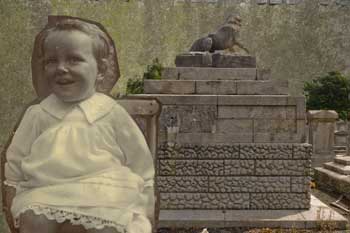
A approach I often use is to treat the whole thing as a simple paper collage in the first instance. Using the Pen and Path tools in Photoshop, simply cut out the various elements as though using a large straight edged scissors with paper. It looks simple and crude at first. No frills and no finesse. No accurate masking or compositing. Leave the seams of your ideas showing, literally. This is about testing a visual idea and seeing if the components might fit together. A maybe maquette. A plausible pre-visualisation. The objective here is cover as much ground as possible with the minimum of effort and the maximum of possible final options.
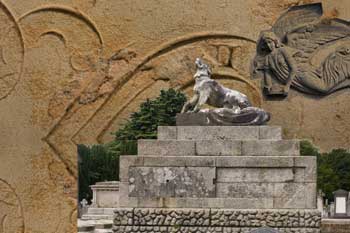
Make a few different images using different components. Make two or three images at the same time swapping components between them. Use the same component in several images. Try several variations of the same image. Play fast and break the rules before you notice you have broken the rules. There is nothing wrong with having fun while you work.
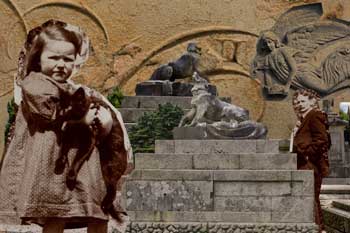
Snip, snip. Does it work? No, trash the layer. Move on.
Snip, snip. Does it work? Yes. OK, keep it for now. Move on.
Resize it. Move it. Blend it. Does it work? Maybe, keep it for now. Move on.
Bottom line? Be ruthless with your own rough work.
Work quick and dirty.
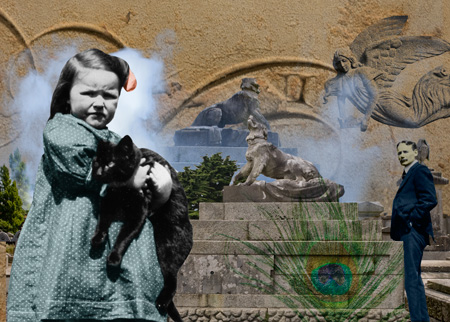
completed image
If, and when, this Quick and Dirty methodology looks like it might produce some worthwhile images then is the time to 'do it with real fish'. Now is the moment to progress the image on to the next stage while it remains raw and fresh. Make a new blank image, reload the necessary image layers, use smart layers, resize, position and get masking for real. And always work non destructively.
- 22/04/2014

© Geoff White 2014. All rights reserved.